Let’s be honest — Nano Banana AI sounds less like a tech tool and more like something you’d order at a tropical juice bar. But somehow, this oddly named app became the internet’s new favorite toy for turning selfies into digital art and cats into astronauts.
Still, even the coolest AIs can get… well, a little boring after the hundredth banana. Maybe Nano Banana turned your face into an alien one too many times, or maybe you just want something that gets your vibe better. Either way, it’s time to meet the competition.
The AI playground is packed with creative misfits like Qwen AI, Flux Kontext, Recraft AI, ChatGPT (DALL·E + GPT-5), and more — each with its own weird superpower. One’s a master of photo edits, another paints like Picasso on caffeine, and one can basically read your mind (in a slightly creepy way).
In this list, we’re peeling back alternatives to Nano Banana AI — and showing you why they’re not quite the same. Spoiler alert: there’s more creativity, chaos, and charm ahead than your GPU can handle.
10 Powerful Alternatives to Nano Banana AI
Nano Banana AI (Gemini 2.5 Flash Image) is Google’s new image editing tool. It helps you make clean and realistic images. You can keep the same face or object in many edits. You can also combine several photos into one. It can follow simple text instructions to change colors, clothes, or details. It supports different art styles and remembers your previous edits. This makes it good for storytellers, marketers, and creators who want professional results.
But it is not perfect. Not everyone can use it yet. You need some practice with prompts to get the best results. It is better at fixing and editing images than creating new, wild art.
If you want more creativity or easier tools, there are other AI options. Some are simple, some are more creative, and some work well for professionals. You can choose one that fits your needs.
1. Qwen AI
When it comes to AI image generation, both Nano Banana AI (Gemini 2.5) and Qwen-Image-Edit-2509 are powerful tools. But they shine in different ways. To see which is better for creators, we compared them across key image types and workflows.
Quick Comparison Table
| Scenario | Winner | Key Takeaway |
| Realistic Portraits | Nano Banana | Maintains facial features and object consistency across edits. |
| Multi-Image Composition | Qwen | Supports combining multiple images like person+scene, person+object, person+person. |
| Product Editing | Qwen | Better for poster creation and product visual consistency. |
| Meme / Text Integration | Qwen | Handles text, fonts, colors, and materials easily. |
| Artistic / Stylized Edits | Qwen | Supports style transfer (anime, Ghibli, sketches) and creative flexibility. |
| Photo Refinement / Minor Edits | Nano Banana | Excels at step-by-step local edits using prompts. |
| Background Change | Qwen | Less prompt-sensitive, more forgiving for casual edits. |
| ControlNet / Pose Adjustments | Qwen | Native support for keypoints, depth maps, sketches. |
| Multi-Turn Edits | Nano Banana | Remembers previous edits for iterative refinement. |
| Price / Access | Qwen | More accessible through Qwen Chat, Hugging Face, ModelScope; Nano Banana often subscription-based or limited rollout. |
Detailed Scenario Comparison
1. Realistic Portraits — Winner: Nano Banana
Nano Banana keeps faces consistent across edits. Details like jawline, hair, and expression are sharper. Qwen performs well but may slightly alter facial proportions in complex poses.
2. Multi-Image Composition — Winner: Qwen
Qwen-Image-Edit-2509 is designed for combining multiple images. It handles scenarios like person+scene or person+product effortlessly, while Nano Banana is more suited for single-image refinement.
3. Product Editing & Posters — Winner: Qwen
For product photos and poster creation, Qwen maintains product identity, adjusts lighting, and integrates text cleanly. Nano Banana can refine products but doesn’t support text customization as effectively.
4. Meme / Text Integration — Winner: Qwen
Qwen can modify fonts, colors, and materials, making it ideal for meme creation or promotional visuals. Nano Banana has limited text editing capabilities.
5. Artistic / Stylized Edits — Winner: Qwen
Qwen supports multiple art styles (anime, Ghibli, sketches) and can generate novel angles or 3D-like views. Nano Banana is better at realistic refinement than highly stylized transformations.
6. Background Change — Winner: Qwen
Qwen tolerates looser prompts and can change scenes or environments smoothly. Nano Banana needs precise instructions to avoid errors.
7. Iterative / Multi-Turn Editing — Winner: Nano Banana
Nano Banana remembers previous edits, allowing step-by-step refinements without starting over. Qwen is strong at multi-image editing but less focused on iterative control.
Pricing and Access:
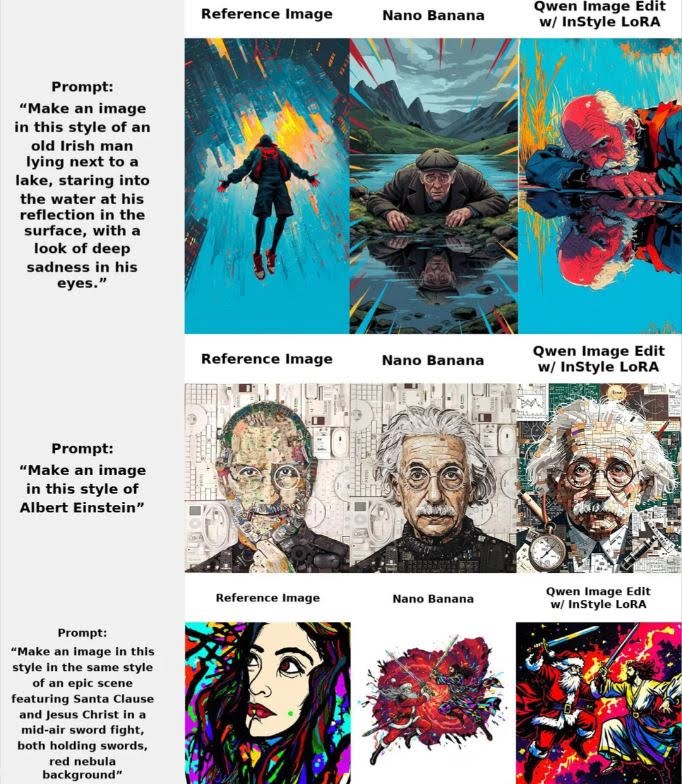
- Nano Banana AI: Google Gemini API pricing is approximately $0.039 per 1024×1024 image (~$30 per million output tokens). Some third-party platforms may offer free versions with limitations or credit-based pricing.
- Qwen Edit (with InStyle LoRA): Open-source friendly. Users can train task-specific LoRAs, enabling more precise style transfers, inpainting, and image editing.
Performance Comparison
- Nano Banana AI: Popular and hyped but closed-source. Works well for general style transfer, though often retains excessive details from input images.
- Qwen Edit w/ LoRA: Performs better across most tasks, especially with task-specific LoRAs. Users reported highly accurate style replication, even for challenging references like anime characters or complex artistic styles.
User Feedback Highlights
- Qwen consistently outperforms Nano Banana in style fidelity and adaptability.
- Open-source flexibility is a major advantage; local models avoid censorship and paid limitations.
- Speed optimization may be required for high-resolution images on limited VRAM setups (users report ~17 minutes per 1024×1024 image on 16 GB VRAM).
Summary
- Nano Banana AI: Quick, cloud-based, but limited by closed-source restrictions and pricing.
- Qwen Edit: Superior style transfer potential, highly customizable, and open-source-friendly, making it ideal for developers and creative communities aiming for task-specific precision.
2. Flux Context
Flux Kontext, born in May 2025 thanks to Black Forest Labs, is like the multitasking wizard of AI image generation. It doesn’t just take your text—it loves a reference image to work its magic. Want your cat to look like a Renaissance painting while sipping a latte? Flux Kontext will give it a shot.
Cool Stuff About Flux Kontext
- Text + Image Power: Feed it a reference and a description, and it combines them like a master chef blends spices.
- Surgical Edits: Tilt a head, change a background, add a coffee mug—all without ruining the rest of the scene.
- Speed Demon: Up to 10 times faster than many competitors. That’s like turning your coffee break into a mini art gallery.
- Style & Text Fun: Whether it’s typography or style transfer, Flux Kontext can mimic any aesthetic you throw at it.
Different Flavors for Different Needs
- Pro: Fast and production-ready.
- Max: Experimental with extra tricks.
- Dev: Open-source and ready for tinkerers.
Tiny Flaws: Too many edits can cause weird artifacts, and it might not know every niche reference in the world.
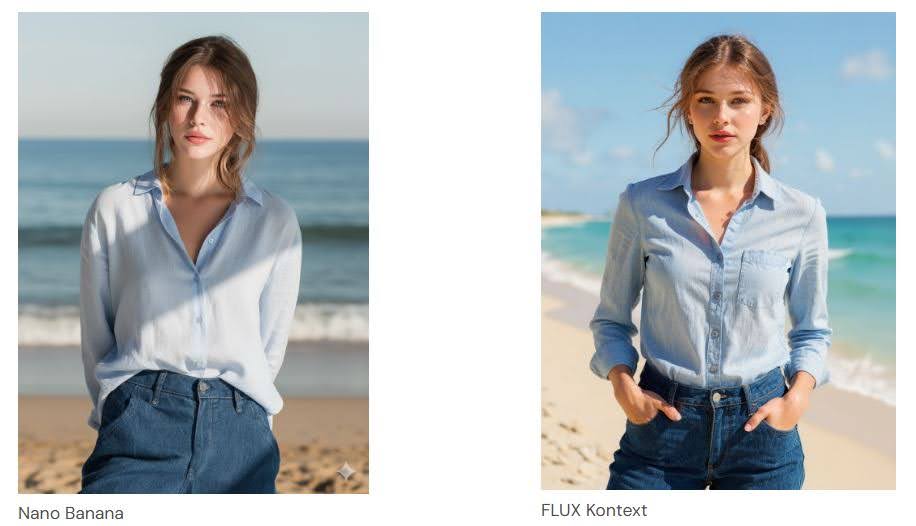
Meet Nano Banana: The Sneaky AI Genius
Nano Banana popped up quietly but made a loud impression. Think of it as that mysterious kid in class who turns out to be a coding prodigy. Rumor has it, it’s part of Google’s ecosystem—possibly linked to the Gemini series or future Pixel devices. The name “Nano Banana” makes it sound small and cute, but don’t be fooled—this model packs serious punch. People love it because-
- Pinpoint Text Editing: Tell it to tweak a picture, and it gets almost scarily accurate. Want to make a robot wear a hat? Done. Want a dragon with a coffee cup? Nano Banana doesn’t blink.
- Face and Character Magic: Freckles, expressions, hair strands—keeps them all intact. Perfect for portraits that don’t look like melted wax figures.
- Fast and Obedient: It listens to prompts like a well-trained puppy. Your edits appear quickly, without turning your image into an abstract nightmare.
- Creative Flexibility: Hyper-realistic, cartoony, or utterly weird—it handles everything with minimal glitches.
Tiny Flaws: Hands, reflections, and text on images sometimes confuse it, but hey, nobody’s perfect.
Nano Banana vs Flux Kontext: Head-to-Head
Let’s pit these two against each other in the ultimate showdown:
| Feature | Nano Banana | Flux Kontext |
| Tech Style | Mystery mix, likely diffusion-based, great for on-device editing | Flow matching, combines text + image for in-context edits |
| Speed & Performance | Fast, excellent character & scene consistency | Lightning-fast, great prompt adherence, may struggle with multiple edits |
| Strengths | Detail master, perfect for faces & portraits | Style flexibility, typography magic, open-source options |
| Weaknesses | Hands, reflections, text struggles | Some artifacts, niche knowledge gaps |
| Best For | Portrait tweaks, fantasy art, mobile edits | Marketing visuals, iterative design, e-commerce content |
| Accessibility | Limited demos & rumored Google integration | Widely available, free dev model, integrated in tools |
In Real Life: Nano Banana is your go-to for flawless character consistency. Flux Kontext wins if you want versatility, reference-based edits, or an open playground for experimentation.
Verdict: Who Should You Choose?
Pick Nano Banana if you want:
- Pinpoint precision
- On-the-go editing
- Portraits that don’t look like a filter explosion
Pick Flux Kontext if you want:
- Endless creative combinations
- Reference-driven edits
- Open-source tinkering
Both are game-changers, so really, you might just need both. Nano Banana is like that quiet kid who always wins the science fair, while Flux Kontext is the extroverted artist impressing everyone with live demos.
Try Flux Kontext here.
3. Myshell AI
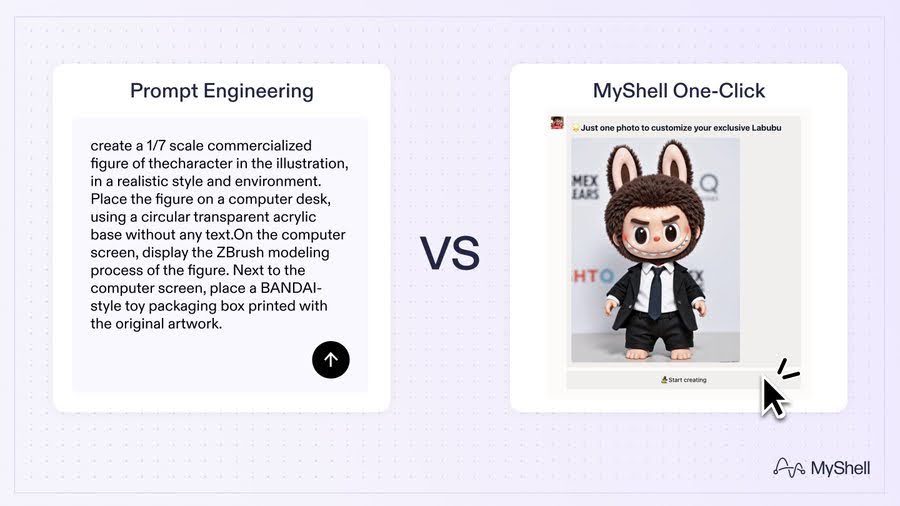
MyShell is a creative AI platform designed to make advanced models like Nano Banana easy for everyone — no prompt engineering, no coding, no chaos.
Built with a state-machine framework and ShellAgent toolset, MyShell automatically refines prompts, keeps styles consistent, and makes generation faster and smoother.
In just two weeks, Nano Banana became one of the most talked-about AI image models online. With over 5M+ votes and 2.5M head-to-head comparisons on LMArena, it’s officially the internet’s favorite AI toy machine.
But while everyone’s hyped about Nano Banana, MyShell quietly proves that it can do everything Banana does — only faster, cleaner, and easier.
Feature Comparison
| Aspect | Nano Banana | MyShell (with Nano Banana) |
| Core Engine | Gemini 2.5 Flash Image | State-machine + ShellAgent integration |
| Ease of Use | Requires long, detailed prompts | One-click templates, no prompt tuning |
| Speed | Fast but inconsistent | Faster due to automatic optimization |
| Consistency | Same prompt can yield varied results | Character and style remain identical |
| Style Control | Manual, prompt-based | Automatic LoRA fine-tuning and locking |
| Output Types | Portraits, figurines, cosplay | All of Banana’s styles + brand visuals, comics |
| Best Use Case | Expert users and prompt engineers | Creators, designers, and newcomers |
| Availability | Gemini App, Google AI Studio | Integrated in MyShell ecosystem |
Why MyShell Wins
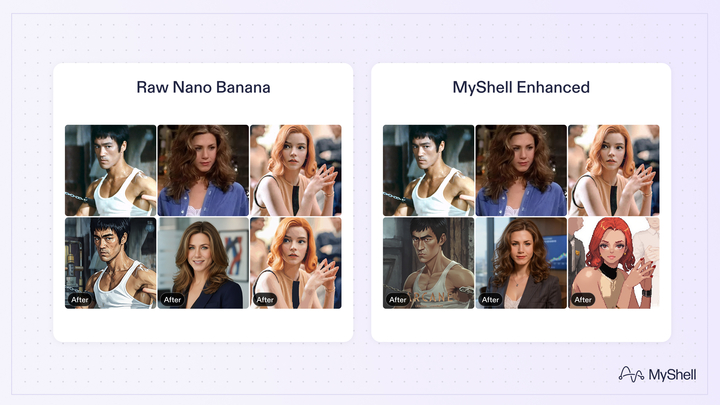
Nano Banana is a technological marvel — but raw power doesn’t equal usability. On its own, it’s dazzling but unpredictable. Within MyShell, it transforms into a dependable creative partner.
That’s because MyShell isn’t just a model runner — it’s an AI creativity ecosystem. It merges top-tier models like Nano Banana with intelligent workflows, template libraries, and community-driven enhancements.
| Advantage | Explanation |
| 1. Simplicity | Upload, pick a style, click generate — no complex prompt crafting. |
| 2. Efficiency | ShellAgent rewrites and optimizes prompts automatically. |
| 3. Consistency | Characters, lighting, and tone remain identical across images. |
| 4. Community Power | Open-source artists refine styles, improving MyShell’s visual accuracy. |
| 5. Reliability | Fewer artifacts, faster generation, smoother workflow. |
Real-World Example
| Scenario | Nano Banana Alone | Nano Banana + MyShell |
| Create a “dog figurine” render | Requires 200-word prompt, trial and error | One-click template via “Figure Me Now” |
| Edit portraits or selfies | Variable results | Consistent facial details and lighting |
| Produce brand visuals | Needs advanced prompt tuning | Maintains exact color palette and theme |
The Verdict
Nano Banana is a technical masterpiece — but using it directly is like flying a jet without autopilot.
MyShell turns it into a smooth, user-friendly experience. It transforms raw power into creative precision, making AI image generation fast, fun, and frustration-free.
Final Thought
Nano Banana made everyone fall in love with AI art again.
MyShell makes sure everyone can actually use it. Try Myshell AI.
4. Seedream AI
Seedream 4 and Nano Banana using the same prompts to test their editing performance. Both are advanced AI image generators, but their results show distinct strengths and weaknesses.
Main Findings
| Aspect | Seedream 4 | Nano Banana |
| Realism | Surprisingly strong realism — on par or even better than Imagen 4 in some tests. | Highly realistic but slightly less visually “polished” than Seedream in texture. |
| Editing Quality | Allows 4K output and size control, but edits often feel like copy-paste overlays; character faces can look unnatural. | More natural-looking edits with smoother blending, even if faces slightly change. |
| Character Consistency | Tries too hard to preserve features — sometimes looks artificial or duplicated. | More organic, even when it slightly reinterprets details. |
| Text and Product Accuracy | Struggles with small text or labels (e.g., shampoo bottles) — often turns words into gibberish. | Handles text and product proportions better; lower resolution hides imperfections. |
| Speed | Slower due to high-resolution output (especially in 4K mode). | Faster and more responsive for iterative edits. |
| Overall Editing Usefulness | Visually rich but less reliable for fine-tuned edits. | More stable and practical for detailed or professional edits. |
Community Opinions
Many users agreed Nano Banana produces more natural and balanced edits, especially for people or products.
Seedream 4 shines in raw visual appeal and 4K quality but struggles with prompt accuracy and text clarity.
Some users combine both tools:
- Generate base image in Seedream 4 (4K)
- Refine specific parts (like faces or products) using Nano Banana,
- Then blend them in Photoshop for the best results.
Common sentiment
- Seedream 4 = Best for visuals and aesthetics.
- Nano Banana = Best for control, consistency, and edits.
Final Verdict
- For photo editing or e-commerce visuals, Nano Banana is more reliable and consistent.
- For creative visuals, concept art, or 4K output, Seedream 4 delivers superior artistic quality.
- Both tools have value — Nano Banana wins for practical editing, while Seedream 4 wins for stunning render aesthetics.
5. Recraft AI
In the rapidly growing world of AI design and image generation, two tools have gained notable attention — Recraft AI and Nano Banana. While both enable creators to transform simple prompts into impressive visuals, they cater to very different needs. Recraft is built for professional design teams, focusing on vector graphics, icons, and branded illustrations with consistent visual identity.
On the other hand, Nano Banana excels at photo-realistic image generation and editing, ideal for artists, photographers, and content creators who want lifelike scenes or cinematic aesthetics. Understanding their unique strengths helps determine which platform best fits your creative workflow.
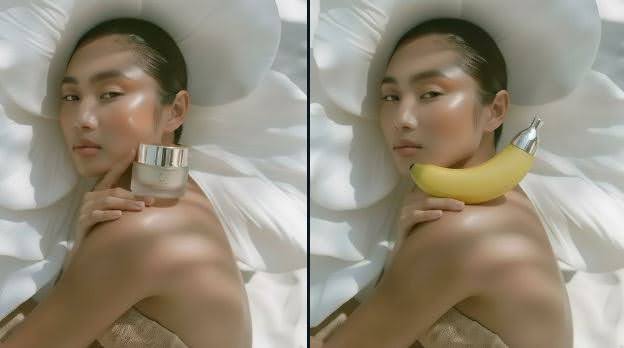
Recraft vs Nano Banana: AI Image Tools Compared
| Feature / Aspect | 🧩 Recraft AI | 🍌 Nano Banana |
| Primary Focus | Design & vector editing — ideal for branding, icons, marketing visuals. | Image generation & photo editing — ideal for photorealistic, AI-generated visuals. |
| Output Type | Vector, illustration, icons, logo designs (editable for print/web). | Raster-based images (photo-realistic, cinematic, artistic). |
| Editing Style | Layered, precise edits (great for color, shape, and style control). | Natural photo-like edits (great for face, background, and object realism). |
| Customization | Upload brand colors, control palette, consistent visual tone. | Use prompts for flexible scene and character changes. |
| Background Tools | Built-in background remover + variant generation in same style. | Object removal, blending, retexturing — more organic but less stylistically consistent. |
| Best For | Designers, illustrators, brand teams, marketing materials. | Photographers, creative editors, product visuals, concept art. |
| Ease of Use | Simple UI for structured workflows (step-by-step creation). | Prompt-based control; more flexible but slightly experimental. |
| Output Resolution | High-resolution exports for web, print, and merch (vector scaling). | Supports high-res raster (up to 4K in some versions). |
| AI Model Nature | More of a design-oriented generator (structured). | More of a creative image model (freeform). |
| Community Focus | Professional designers, agencies, brand creators. | Artists, AI photographers, general users. |
Key Differences
| Category | Recraft Strength | Nano Banana Strength |
| Visual Control | Precise, consistent design outputs. | Dynamic, realistic photographic outputs. |
| Style Variety | Great for flat, minimal, illustrative looks. | Great for cinematic, natural, stylized looks. |
| Editing Power | Excellent for brand design pipelines. | Excellent for creative image reworks. |
| File Flexibility | Scalable vectors (SVG, EPS, PNG). | High-quality raster (PNG, JPG, WEBP). |
Verdict
- Choose Recraft if you’re a designer or brand creator — it excels in logos, icons, and vector illustrations with professional consistency.
- Choose Nano Banana if you’re an AI artist or photo editor — it delivers realistic, artistic, and human-like visuals ideal for storytelling or marketing content.
Summary
Recraft = Design Precision.
Nano Banana = Creative Realism.
6. ChatGPT (DALL·E + GPT-5)
Just when we thought the AI space couldn’t get more exciting, Google dropped a new surprise — Gemini 2.5 Flash Image, affectionately called Nano Banana. And honestly, it’s a treat to use!
Fast, precise, and intuitive — Nano Banana makes image editing and generation incredibly fun. I tested it across multiple creative tasks, from outfit changes to ad banners, and let’s just say, the hype on X (Twitter) is totally justified.
But wait — how does it stack up against OpenAI’s GPT-5 (and GPT-4o)? Both are known for their visual generation and editing abilities, so I decided to put them head-to-head.
How to Access Each Model
Nano Banana (Gemini 2.5 Flash):
You can try it directly through the Gemini/Google AI Studio. Just select 2.5 Flash at the top and click “Create Images” under the Tools section. (Free token limit: 32,768)
GPT-5 (ChatGPT):
I used the ChatGPT Plus subscription for this test. You can access GPT-5 through the ChatGPT web interface or the mobile app.
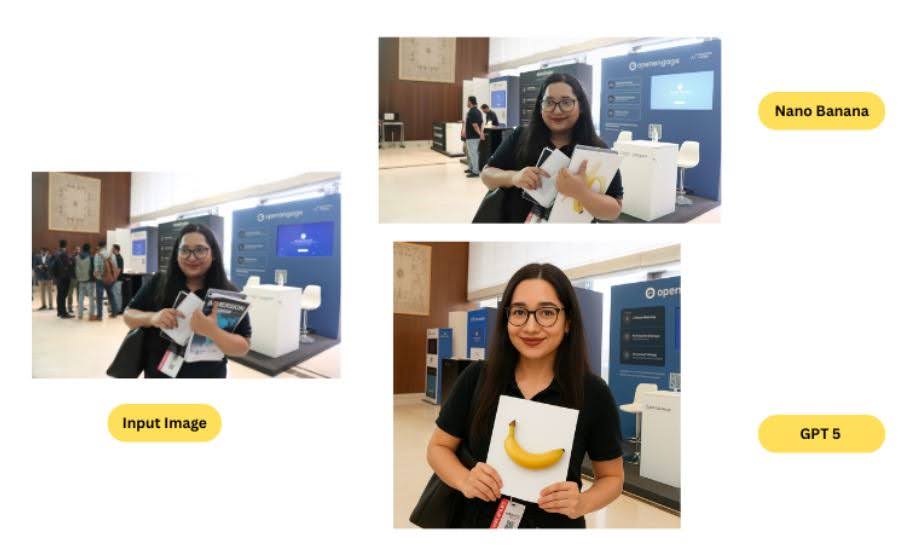
Nano Banana vs GPT-5
| Task | Winner | Reason |
| Changing Outfit | Nano Banana | Accurate facial preservation |
| Create Ad Banner | Tie | Both excelled in different aspects |
| Generate New Image | Nano Banana | More natural and expressive results |
| Multi-Step Editing | Nano Banana | Followed all instructions perfectly |
| Add a New Person | Nano Banana | Sharper integration and realism |
| Enhance Image | Nano Banana | Balanced contrast and detail |
After testing both models, it’s clear that Nano Banana (Gemini 2.5 Flash) currently leads in image-related tasks. Its ability to follow complex instructions, preserve natural details, and maintain creative consistency is truly impressive.
GPT-5 remains powerful, especially for multimodal reasoning and text-based work — but when it comes to pure image magic, Nano Banana takes the crown.
7. DeeVid AI Image Generator
DeeVid AI Image Generator isn’t just another image tool — it’s a complete creative suite. It integrates models like Nano Banana and SeerDream 4.0, offering advanced editing, inpainting, and outpainting options along with video animation tools.
Nano Banana is like a high-speed sketch artist. It excels at quickly turning ideas into images, refining details, and exploring multiple visual concepts.
DeeVid AI is like a full production studio. It takes the images (often generated by Nano Banana), animates them, applies advanced editing, and produces finished video content ready for sharing or marketing.
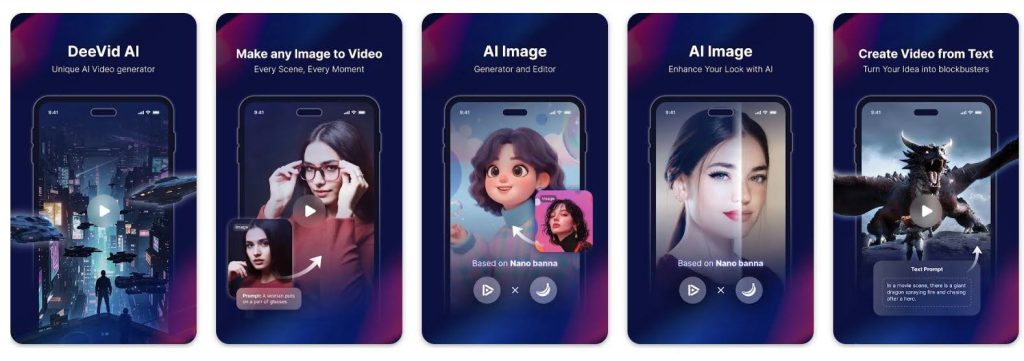
How the Two Work Together
Here’s how DeeVid AI and Nano Banana complement each other in a real-world workflow:
| Aspect | DeeVid AI Image Generator | Nano Banana AI |
| Primary Role | Full creative suite for image and video generation | Dedicated image generator and editor |
| Core Strengths | Image-to-video animation, inpainting/outpainting, SeerDream 4.0 integration for refinement | Speed, creative ideation, high-quality image editing |
| Workflow | Combines Nano Banana’s image generation with DeeVid’s animation tools for a smooth image-to-video pipeline | Focused solely on creating and editing static images |
| Example Use Case | Generate an image using Nano Banana, then animate it with DeeVid’s tools to produce a marketing clip or explainer video | Create multiple design drafts, edit visuals using prompts, or prepare assets for animation |
8. Leonardo AI
Nano Banana excels in realistic image generation and multi-turn conversational editing. Its strengths include:
- Ultra-fast performance: Generates images in milliseconds to a few seconds, ideal for real-time applications.
- High-fidelity realism: Preserves fine details like facial features and lighting, with low FID scores.
- Advanced editing: Supports natural language-based edits and inpainting, allowing iterative adjustments while maintaining identity and scene consistency.
- Technical sophistication: Built on a multi-turn conversational model with advanced reference synthesis, optimized for both cloud and mobile GPU deployment.
- Use cases: Enterprise digital transformation, marketing, social media content, and client-focused projects where precision and speed are critical.
Leonardo AI
Leonardo AI focuses on artistic expression, offering creative flexibility for digital artists and designers. Key features include:
- Artistic output: Generates stylized, visually striking images suitable for illustration, fantasy landscapes, and conceptual art.
- Customizability: Offers extensive tools to adjust style, mood, textures, and colors, with community-shared presets enhancing creativity.
- Intuitive interface: Designed for experimentation, enabling dynamic adjustments and interactive artistic workflows.
- Use cases: Digital art, game design, concept art, and creative advertising where stylistic diversity and visual storytelling are prioritized.
You can use the Nano Banana model within Leonardo AI by providing an image reference along with a descriptive prompt. For example:
“Generate a 1/4 scale commercial figure of the character in the reference image, rendered in a realistic style and environment. Position the figure on a computer desk with a circular oak base featuring a gold accent, without any text. On the computer screen, show the Adobe Illustrator modeling process of the figure. Next to the screen, place a TEUN-style toy packaging box featuring the original character image.”
This approach allows you to combine photorealistic generation from Nano Banana with Leonardo AI’s flexible creative environment, producing highly detailed and context-rich visuals.
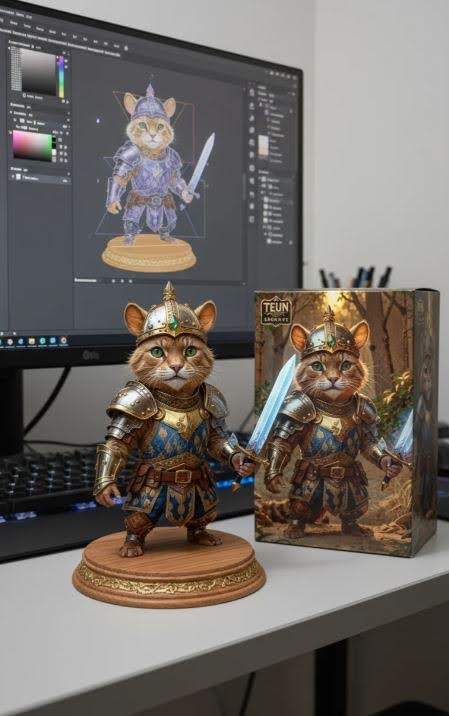
Feature Comparison
| Feature | Nano Banana | Leonardo AI |
| Image Quality | Photorealistic, high detail | Artistic, expressive style |
| Editing | Multi-turn, natural language, consistent | Creative, style-focused, interactive |
| Speed | Milliseconds–few seconds | Fast, slightly slower with complex styles |
| User Interface | Minimalistic, guided, workflow-focused | Visual, rich, community-driven |
| Technical Specs | Multi-turn conversational model, FID ≈12.4, 94% text accuracy | Proprietary style engine, extensive parameter control |
| Applications | Enterprise, marketing, client projects | Digital art, entertainment, conceptual design |
For enterprises and marketing teams: Nano Banana is ideal for projects requiring realistic, consistent visuals with rapid iteration and API integration.
For digital artists and creative professionals: Leonardo AI excels in artistic flexibility, expressive imagery, and experimental workflows.
9. Easemate AI
Nano Banana in EaseMate and traditional AI image tools (or even similar AI models) are not the same:
| Aspect | Nano Banana in EaseMate | Other AI Image Tools / Models |
| Underlying Model | Uses Google Gemini 2.5 Flash Image, a next-gen, lightweight, and fast image model. | May use older models (DALL·E, Stable Diffusion, MidJourney) that can be slower, less efficient, or less context-aware. |
| Speed | Optimized for milliseconds-to-seconds generation. | Many models take longer (seconds to minutes) due to heavier computation. |
| Accessibility | Integrated in EaseMate, a user-friendly platform requiring no credits for basic use. | Some platforms are paid-only, require API setup, or need technical knowledge. |
| Text Understanding | Highly detailed natural language comprehension, can interpret complex prompts like “a dragon flying over New York City in cinematic style.” | Older models may misinterpret or oversimplify complex prompts. |
| Editing & Blending | Supports image editing, blending, style transfer, and character/object consistency in one tool. | Other tools might only do one function (text-to-image, or style transfer, etc.) and often require separate tools for blending or edits. |
| Ease of Use | Designed for non-designers: simple interface, quick results, no watermarks for basic tasks. | Some tools target developers or advanced users, with complex interfaces and more manual tweaking. |
| Versatility | Can handle text-to-image, image edits, style transfers, and aspect ratio control in one platform. | Many AI image generators focus on one or two functions, requiring multiple tools for full creative workflows. |
| Target Users | Bloggers, marketers, students, designers, educators — easy adoption for productivity. | May focus on professional designers or require paid licenses for commercial use. |
| Cost | Free for basic tasks; pay-as-you-go API available if needed. | Many other tools are subscription-based or credit-based, limiting casual users. |
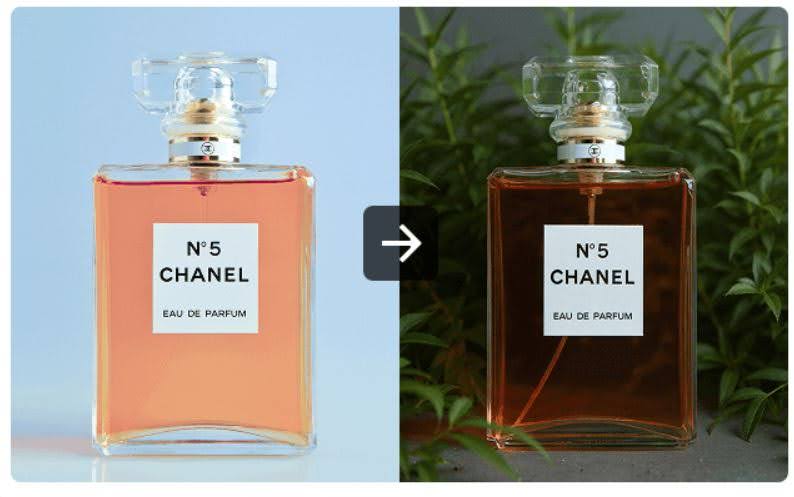
Why They Are Not the Same
- Model Architecture – Nano Banana uses Gemini 2.5 Flash, which is faster, lighter, and more context-aware than older AI models.
- Integrated Platform – EaseMate wraps Nano Banana in an easy-to-use interface that combines multiple AI functions (edit, blend, style transfer), while many competitors separate these tasks.
- Accessibility & Free Use – EaseMate allows users to generate and edit images without upfront cost or technical setup, unlike many paid AI platforms.
- Output Consistency – Nano Banana is designed to maintain character and object consistency across images, which is difficult in most other tools.
- Speed & Efficiency – Generating images in seconds, versus waiting minutes, makes it more practical for casual and professional use.
Bottom line: Nano Banana in EaseMate is not just another AI image generator—it’s a fast, versatile, and user-friendly tool that combines multiple image AI capabilities in one accessible platform, while many other AI tools focus on isolated functions or require more technical setup.
10. Pollo AI
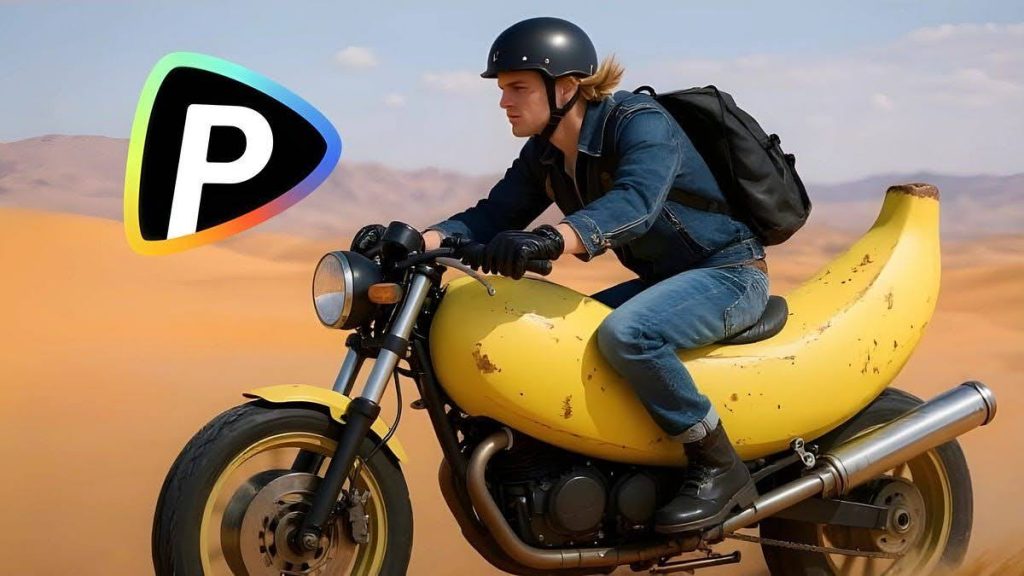
Pollo AI supporting Nano Banana
What it is: A platform (Pollo AI) that integrates multiple AI image and video models, including Nano Banana.
Key features:
- Provides a user-friendly interface to use Nano Banana without technical setup.
- Offers unlimited image generation for paid users—so you don’t have to worry about API calls or costs individually.
- Supports other AI media generators too, not just Nano Banana.
- Cost & accessibility: Even free users can try Nano Banana, but unlimited use is for paid subscribers.
So Pollo AI is the platform or service that gives you access to Nano Banana easily, with extra perks like unlimited generation.
Main Difference
| Feature | Nano Banana | Pollo AI |
| Type | AI image model | Platform/service using AI models |
| Function | Generates and edits images | Lets you use Nano Banana and other models easily |
| Cost Handling | API-based, pay per image | Subscription-based, can offer unlimited images |
| Audience | Developers, AI enthusiasts | Casual users, artists, creators |
In short:
Nano Banana is the engine.
Pollo AI is the car that drives that engine for you, with a smoother ride and unlimited fuel if you pay.
Conclusion
Nano Banana AI may have captured the spotlight with its uncanny ability to preserve likeness and produce seamless edits, but the AI creative landscape is far from one-size-fits-all. Each alternative — from Qwen AI’s precision to Flux Kontext’s stylistic flair, or Recraft AI’s playful experimentation — brings something unique to the table.
Whether you’re chasing photorealism, surreal artistry, or just a fun twist on your selfies, exploring these options reminds us that AI creativity isn’t about replacing one tool with another. It’s about finding the right companion for your vision, experimenting without limits, and embracing the delightful chaos of digital imagination.